



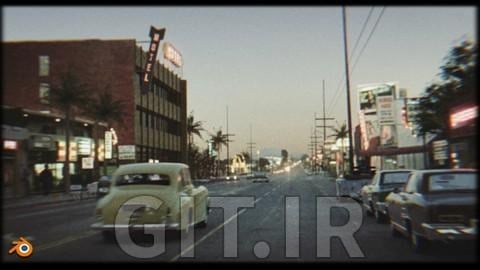
در این آموزش Blender، به صورت مرحلهبهمرحله به شما نشان خواهد داد که چگونه Render و Animation ایجاد کنیم که ما را به 50 سال قبل ببرد.
اما مدرس یک آموزش کوتاهتر 1 ساعته نیز ضبط کرده که در آن 1 صحنه دیگر را به عنوان جایزه ایجاد میکنیم.
بنابراین در این آموزش جامع، ما 2 صحنه با یک خیابان و یک خودرو ایجاد خواهیم کرد.
مدرس تصمیم گرفت روند ساخت 2 صحنه را ضبط کند زیرا از 2 روش کمی متفاوت استفاده میکند.
در صحنه اول، خیلی به تصویر Reference پایبند نیستیم و او بیشتر از دارایی های قبلی یا اینترنت استفاده میکند. به این ترتیب میتوانیم سریع و آسان به نتیجه نهایی برسیم، در این مورد تنها در حدود 1 ساعت.
در بخش دوم آموزش، که کاملاً مرحلهبهمرحله است، به عکس Reference پایبند میمانیم تا آن را زنده کرده و به Animation تبدیل کنیم.
او به شما نشان میدهد که چگونه از عکس نه تنها به عنوان Reference استفاده کنید، بلکه چگونه از برخی تکسچرها برای سرعت بخشیدن به فرآیند، نزدیک شدن به مرجع، و رسیدن سریعتر و آسانتر به یک نتیجه واقعگرایی استفاده کنید.
علاوه بر آموزش، فایلهای نهایی .blend و همچنین 2 بسته دارایی که در آموزش استفاده میکنیم را با شما به اشتراک خواهم گذاشت.
در این آموزش در مورد مدلسازی، تکسچرینگ، نورپردازی، کامپوزیشن و پس پردازش صحبت خواهیم کرد.
مدرس به شما نشان میدهد که چگونه از یک عکس Reference برای ایجاد مدلهای 3D و همچنین چگونگی استفاده از آن به عنوان Texture استفاده کنید.
ما همچنین از چندین Modifier استفاده خواهیم کرد و در مورد دوربین، اصلاح رنگ، استفاده از Compositor در Blender و موارد دیگر صحبت میکنیم.
این دوره برای چه کسانی مناسب است؟
Complete Blender course, city environment, car-2 courses
In this Blender tutorial I'm going to show you step-by-step how to create render and animation that will bring us back 50 years in time.
But I also recorded a shorter one-hour tutorial where we create one more scene as a bonus .
So in this master tutorial , we will create two scenes with a street and a car.
I decided to record the creation of two scenes because I use two slightly different methods
In the first scene, we don't stick too much to the reference image and I mostly use assets from before or from the Internet. In this way, we can quickly and easily reach the final result, in this case in only about one hour
In the second part of the tutorial, which is completely step-by-step, we stick to the reference photo that we will bring to life and turn into animation
I will show you how to use the photo not only as a reference but also how to use some of the textures to speed up the process, get closer to the reference, and get a realistic result faster and easier
In addition to the tutorial, I will share with you the final .blend files as well as the 2 assets packs that we use in the tutorial
In the tutorial, we will talk about modeling, texturing, lighting, composition, post-processing…
I will show you how to use a reference photo to create 3D models and how to use it as a texture
We will also use several modifiers and talk to the camera, color correction, use the blender compositor, and more
This is the workflow I've learned in 5 years of experience in Blender and I'm glad to share it with you
برای مشاهده این درس، لطفاً ابتدا وارد حساب کاربری خود شوید.
برای دسترسی به این دوره یکی از گزینه های زیر را انتخاب کنید:
مناسب برای تهیه چندین دوره
برای دسترسی به این دوره، ابتدا آن را به لیست دورههای من اضافه نمایید.



نظرات کاربران