












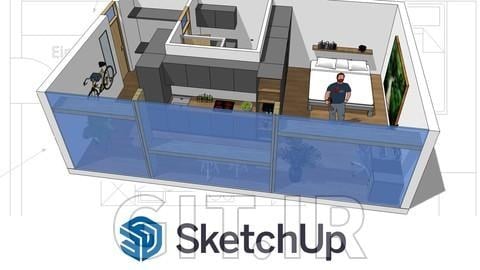
آیا دوست دارید آپارتمان خود را بازسازی کنید، آشپزخانه خود را بازطراحی کنید یا خانه رؤیایی خود را بسازید؟ این دوره مناسب شماست: با استفاده از SketchUp Free، نسخه رایگان و تحت وب این ابزار مدلسازی سهبعدی محبوب، ما در کمتر از یک ساعت و نیم یک موقعیت زندگی واقعی را از ابتدا بازسازی خواهیم کرد.
این دوره، آموزش کامل SketchUp نیست، بلکه یک تمرین جامع برای آشنایی با کار سریع در این نرمافزار ساده CAD روی یک نمونه عملی است تا بتوانید پروژههای خود را با آن شروع کنید.
به جای ارائه نظریه زیاد، بلافاصله با رویکرد عملی شروع میکنیم. نقشه طبقهای موجود را به عنوان قالب وارد میکنیم (میتوانید از پلان طبقه خودتان هم استفاده کنید) و آن را به مقیاس مناسب میرسانیم. سپس نقشه دوبعدی را میسازیم که شامل مبلمان، اندازهها و تگها است. همچنین از تگها برای نظم و وضوح نقشه بهره خواهیم برد.
از نقشه دوبعدی نهایی، به سمت ساخت مدل سهبعدی میرویم. در این بخش بیشتر روی کار سریع در SketchUp تمرکز میکنیم؛ یعنی چطور در عرض چند دقیقه لایههای مختلف از دیوارها تا مبلمان را بسازیم و چگونه با استفاده از مدلهای پیشساخته در کتابخانه 3D کار خود را بسیار آسان کنیم و آنها را به دلخواه شخصیسازی کنیم. در نهایت برای داشتن مدل جذاب، نحوه استفاده از رنگها و تکسچرها و روشهای مختلف ارائه مدل را یاد میگیریم.
اگر دانش کمی یا حتی هیچ دانشی از SketchUp ندارید و میخواهید تجربه عملی با پلانهای طبقه و مدلسازی کسب کنید، این دوره برای شما مناسب است.
هیچ نرمافزاری به اندازه SketchUp اجازه نمیدهد مدلهای سهبعدی تأثیرگذاری را اینقدر سریع بسازید که تأثیر فضایی پروژهتان را بلافاصله منتقل کند. مزایای SketchUp عبارتند از:
چیز زیادی لازم ندارید! با ابزارهای زیر میتوانید بلافاصله مدلسازی سهبعدی را شروع کنید:
این دوره برای چه کسانی مناسب است؟
SketchUp Free - From Floor Plan to 3D Model
Kitchen, apartment or tiny house - plan, develop and visualize your ideas in SketchUp!
Would you like to remodel your apartment , redesign your kitchen , or build your dream home ? Then this is the course for you: Using SketchUp Free, the web-based and free version of the popular 3D modeling tool, we will recreate a realistic living situation from scratch in just under 1.5 hours.
This is not a complete SketchUp course, but a comprehensive exercise to get to know how to work quickly with the simple CAD program on a concrete example, so that you can start your own projects with it.
Instead of a lot of theory, we will start immediately with a practical approach and import an existing floor plan as a template (you are also welcome to work with your own floor plan) and bring it to the right scale. On top of that we will build our 2D plan, including furniture, dimensions and labels. We will also work with tags to bring order and clarity to the plan.
From the finished 2D plan, we'll move on to building our 3D model. Here we will mainly practice working quickly in SketchUp: How we build different layers in minutes, from the walls to the furniture, and how you can save yourself a lot of work with the pre-built models from the 3D library and customize them as you like. Last but not least, you want the model to look good: You'll learn how to use colors and textures, and different ways to present your model in different styles in an appealing way.
This course is for you if you have little or no SketchUp knowledge and want to get some hands-on practice with floor plans and modeling.
What are the benefits of SketchUp?
No other software allows you to build impressive 3D models so quickly that instantly convey the spatial impact of your project. The advantages of SketchUp:
there is a free, web-based version
it's probably the easiest of all CAD programs to use
you are immediately in 3D and see your results
There is a huge library of pre-built 3D models
you can do a lot with it - nothing you can't design with it!
Not much! With the following tools you can start 3D modeling right away:
a computer mouse with clickable mouse wheel (trackpad works too, but mouse is easier and faster ;)
not a must, but handy: a big screen
با ورود یا ثبتنام رایگان، به این درس و بقیه محتوای این دوره دسترسی خواهید داشت.
برای دسترسی به این دوره، یکی از گزینههای زیر را انتخاب کنید:
مناسب برای تهیه چندین دوره
با اشتراک ویژهای که دارید، کافیست این دوره را به لیست دورههای خود اضافه کنید تا بلافاصله به آن دسترسی داشته باشید.






نظرات کاربران